ManicTime has always been built to keep your data. It tracks activity on your computer, stores it locally, and syncs it with ManicTime Server or ManicTime Cloud when needed. This local-first design is useful: ManicTime works offline, sync is reliable, and users stay in control of their data.
But many organizations cannot keep detailed activity data forever. Privacy policies, labor agreements, GDPR, UK GDPR, CCPA/CPRA, and similar rules often require a clear retention period: how long data is kept before it is deleted.
ManicTime Server already had a way to limit how much old data users could see in reports. For example, an administrator could show only the last 90 days. That was useful, but it only limited visibility. The old data still remained in the database.
The data retention setting works differently. ManicTime deletes old automatically tracked data from the server and from connected clients as they sync. Once data is deleted, it is gone and cannot be recovered. This turns the setting into a real storage policy, not just a report filter.
Why this was hard
Deleting old data in ManicTime is not as simple as deleting rows from one table.
ManicTime stores timeline data in a way that makes client-server sync reliable. A normal delete can hide an old activity from the timeline, but parts of its history may still exist internally. For a true delete feature, that is not enough.
The data also lives in more than one place. A server can have a copy, and each connected client can have its own local copy. If old data is deleted only on the server, a client could later sync and bring it back.
To make the feature work, ManicTime had to do three things:
- remove old automatically tracked activity data from timelines and reports;
- clean up the stored history behind that data;
- make the server and connected clients agree on the same result.
That is why this feature took much more work than a simple scheduled delete.
How to turn it on
The data retention feature requires ManicTime Server v2026.2.1 or newer and ManicTime clients v2026.2 or newer. Connected clients should be updated so they can apply the policy locally.
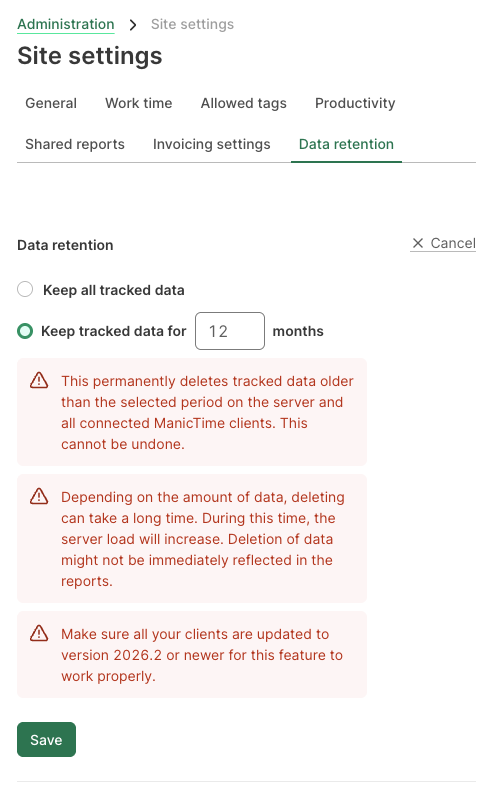
In ManicTime Server, open Administration → Site settings → Data Retention.
You can choose:
- Keep all data — the default behavior.
- Keep tracked data for N months — delete automatically tracked data older than the selected number of months.
The setting is server-wide. It is not per-user or per-team. Once enabled, it applies to automatically tracked data for everyone on the server.
The feature does not delete user created tags or tag timelines. It is meant for automatically collected activity history, such as computer usage, application, and document timelines.
How it works
After the setting is enabled, ManicTime periodically checks for automatically tracked data older than the configured retention period. The cleanup runs in the background.
ManicTime deletes old activities and then compacts the timeline history, so deleted data is not just hidden from the UI but removed from the retained working history. On servers with a lot of historical data, the first cleanup can take some time because ManicTime processes old data gradually. After that, cleanup becomes routine maintenance.
The cleanup is sync-aware. Connected clients receive it during synchronization and apply it to their local databases. Offline devices catch up when they reconnect. If a client does not connect for more than 30 days, ManicTime Server will start deleting old data from the server copy of that client's timelines, so old data does not stay on the server forever just because a device stopped syncing. Clients older than v2026.2 should be updated before relying on the policy across all devices.
Backups and exports are separate. The policy applies to ManicTime's live server and client data. If your organization keeps database backups, exported reports, or copied files for longer periods, those need their own retention rules.
Why it matters for privacy and compliance
Automatically tracked activity data is usually personal data. It can show which applications someone used, which websites they visited, which documents they opened, and when they were active or away. In an employee-monitoring context, that can be sensitive.
Under the GDPR, two principles are especially relevant:
- Storage limitation — personal data should not be kept longer than necessary.
- Data minimization — organizations should keep only the personal data they actually need.
The feature helps support these principles by turning a rule such as "keep 6 months" or "keep 12 months" into an automatic policy. It can also help with internal privacy policies, works council agreements, customer contracts, and deletion expectations under the right to erasure.
This is not legal advice, and enabling the feature does not by itself make an organization compliant. You still need to choose the right retention period, document the policy, manage permissions, and apply appropriate rules to backups, exports, and other copies.
The data retention feature gives ManicTime administrators a simple way to enforce a clear limit on how long automatically tracked activity history is kept.